How to Reset Your Pikel Password


Locked out because you can't remember your Pikel password? It's a two-minute fix, and you never have to leave the app to do it. Pikel emails you a 6-digit code, you type it in, and you set a fresh password on the spot — no magic link to hunt for in your inbox, no browser tab. Here's the whole flow, plus the one case where there's simply no password to reset.
Step 1 — Open the email sign-in screen and enter your email
From the welcome screen, tap Continue with Email, which brings up the email sign-in screen (titled Sign in to your account on iPhone, Sign in with Email on Android). Type your email address into the email field. You don't need to know your password here — you just need Pikel to know which account to send the reset code to, and the email field is how it figures that out.
Step 2 — Tap "Forgot password?"
Just below the Sign in button you'll see a Forgot password? link. Tap it. Pikel emails a 6-digit reset code to the address you entered and slides you straight to the Reset your password screen. (If you leave the email field empty, Pikel nudges you with "Enter your email address first." — so fill it in before tapping.)
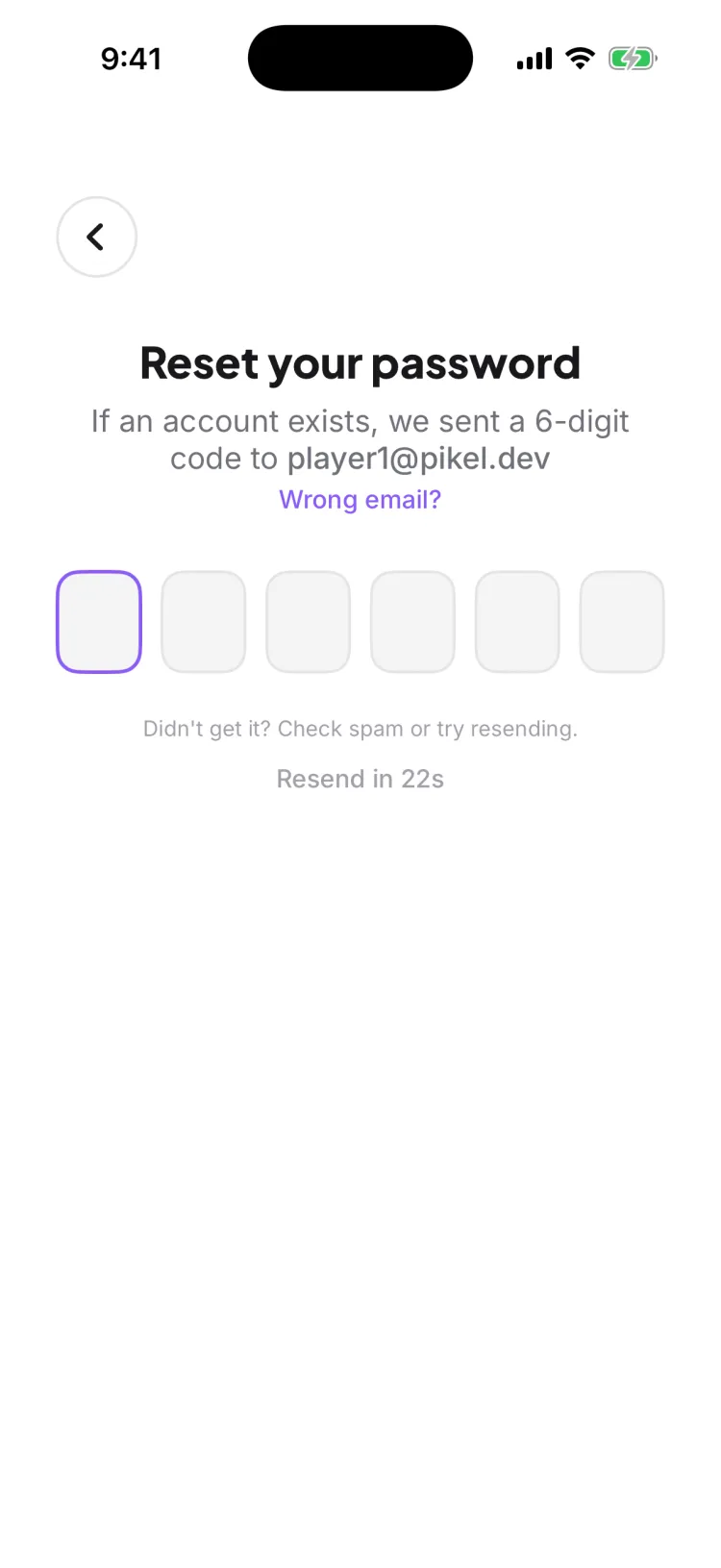
For privacy, iPhone's confirmation reads "If an account exists, we sent a 6-digit code to…" — Pikel won't confirm out loud whether an email is registered, so nobody can use this screen to fish for who has an account. (Android's screen says "Enter the 6-digit code we sent to [your email]".) If you do have an account, the code is already on its way.
Step 3 — Enter the 6-digit code
Check your email for the code and type it into the six boxes on the Reset your password screen. There's no separate Submit button to hunt for — the moment the sixth digit lands, Pikel verifies it automatically and moves you forward.
Didn't get it? A few things help:
- Check spam or junk — reset emails occasionally land there.
- Resend — after a 60-second countdown, a Resend email button appears. Tap it for a fresh code.
- Wrong email? — tap this link to go back and fix a typo in the address.
- Too slow? — codes expire after about ten minutes. If yours has gone stale, just request a new one.
Step 4 — Create a new password
Once the code checks out, you land on Create a new password. Enter your new password twice — once in New password and once in Confirm new password — and tap the eye icon on either field if you want to see what you're typing. A couple of rules to know:
- At least 8 characters.
- Not a breached password — Pikel checks your choice against known public data breaches and will ask for a different one if yours has been exposed.
- Different from your old password, and both fields have to match.
Tap Update password and you're done — Pikel signs you in on the spot and drops you straight into the app. Behind the scenes it also signs you out of every other device, so a reset doubles as a clean sweep if anyone else was in your account.
Signed up with Apple or Google? There's nothing to reset
If you joined Pikel by tapping Continue with Apple or Continue with Google, you never created a Pikel password in the first place — Apple or Google handles signing you in. So "Forgot password?" doesn't apply to you, and there's genuinely nothing to reset. Just head back to the welcome screen and tap the same Continue with Apple or Continue with Google button you used before, and you're right back in. The reset flow above is only for accounts made with an email and a password.
Pro tip
The reset code and the sign-in email have to match, so use the same address you actually signed up with — if you have two inboxes, that's the one to type in Step 1. And because setting a new password signs you out everywhere else, keep the new one somewhere you'll remember (a password manager is perfect): you'll want it handy to sign back in on your other phone or tablet. If a reset ever arrives that you didn't request, that's your signal someone tried to get in — resetting immediately locks them out.
Get started
Pikel is live on iOS and Android — one account, your whole pickleball life.
Frequently asked questions
I forgot my password — how do I reset it?
On the email sign-in screen, type your email into the field, then tap 'Forgot password?'. Pikel emails a 6-digit reset code to that address. Enter the code to verify, then set a new password — it's a code, not a link, so you finish the whole thing right inside the app without leaving to your inbox and back.
Is the reset a link or a code?
A code. Pikel sends a 6-digit numeric code, not a clickable magic link. You type the six digits into the 'Reset your password' screen and it checks itself the moment the last digit lands — then it takes you straight to 'Create a new password'. Nothing to open in a browser.
I signed up with Apple or Google — how do I reset my password?
You don't have one to reset. If you tapped Continue with Apple or Continue with Google when you joined, you never set a Pikel password — that provider signs you in. Just tap the same Continue with Apple or Continue with Google button on the welcome screen and you're back in. Forgot password? only applies to email-and-password accounts.
The code didn't arrive — what now?
Check your spam or junk folder first; reset emails sometimes land there. On the code screen there's a 60-second countdown, after which a Resend email button appears — tap it for a fresh code. If the email itself was wrong, tap 'Wrong email?' to go back and fix it. Codes also expire after about ten minutes, so if you've been sitting on one, request a new one.
What are the rules for the new password?
It needs to be at least 8 characters, and it can't be one that's turned up in a known data breach — Pikel checks against public breach lists and will ask you to pick a different one if yours is compromised. It also has to be different from your old password. The two fields have to match before the Update password button turns on.
Does resetting my password log me out on my other devices?
Yes — on purpose. When you set the new password, Pikel signs you in on the device you're holding and signs you out everywhere else. That's the safety net: if someone else was in your account, a reset quietly kicks them out. You'll just sign back in on your other phone or tablet with the new password.