How to Find Open Pickleball Games Near You


"Open games" are pickup games that anyone can join — no club membership required. Someone sets one up at a court, marks it public, and it shows up for players nearby to find and RSVP. Pikel gathers all of them into one place: the Explore tab. Here's how to find a game near you and get yourself into it.
Step 1 — Open the Explore tab
Tap Explore in the bottom bar — it's the magnifying-glass tab, sitting between Home and the center Create button on both iOS and Android. What you land on differs by platform: on Android Explore opens straight on the feed; on iOS it opens on a map of nearby courts — tap the List toggle (top-right) to switch to the feed. The feed leads with a header that reads Explore, a search field, and a row of filter chips (All, Popular, New).
One thing worth knowing up front: that search box says "Search clubs near you…" and the All/Popular/New chips filter clubs, not games. The open games live in their own card just below — you don't need to touch the search to find them.
Step 2 — Find the Open Games card
Scroll a touch and you'll hit the Open Games card (the one with the little lightning bolt). It shows a preview of the next couple of games, each with the game's time, its venue, and how many spots are left. At the bottom is a See all link with a running count — tap it to open the full list.
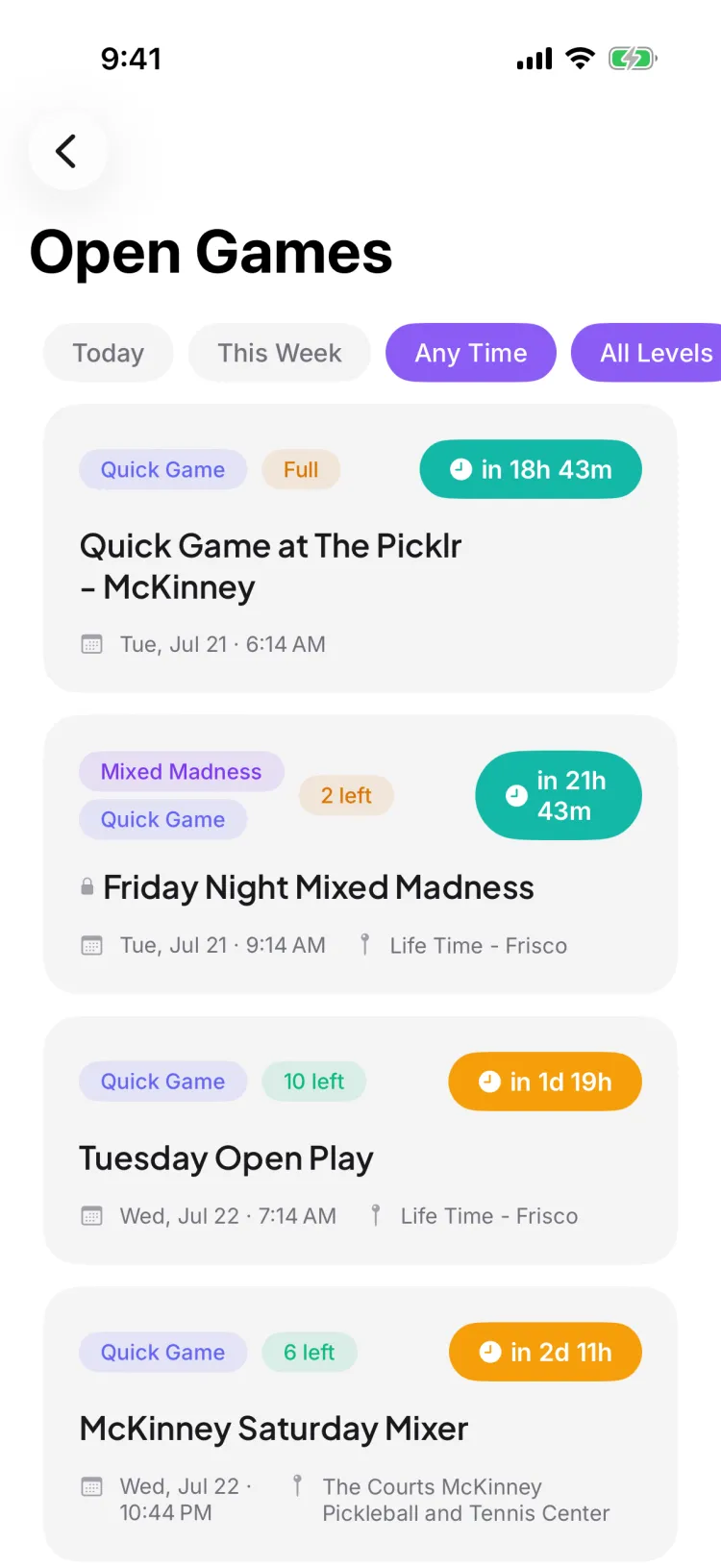
The full list is titled Open Games and shows the soonest games first — the ones starting next, including any that are live right now. Public games tap through to their details; private ones show up as locked, info-only rows in the same start-time order. Every card carries its venue and start time, so you can tell at a glance where and when each game is.
Step 3 — Filter by time and skill
At the top of the Open Games list is a scrollable row of filter chips in two groups:
- Time — Today, This Week, or Any Time.
- Skill level — All Levels, 3.0+, 3.5+, or 4.0+.
Pick a time and a level to narrow the list to games that actually fit your evening and your level. To clear a filter, tap the default Any Time and All Levels chips; and if your picks leave no games, the empty state shows a Show all games button that resets them. If a game is private, it shows up as an info-only row with a lock icon: you can see it exists, but it isn't tappable to join. Public games tap straight through to their details.
If nothing comes back — "No open games nearby" — that's your cue to host one; the empty state has a Create Open Game button that drops you into game creation.
Step 4 — Tap a game and RSVP
Tap any public game to open its detail screen. Because it's an open game, you can RSVP even if you're not in the host's club — hit the RSVP control and you're on the roster. A few things you might run into:
- The game's full? Join the waitlist. If a confirmed player later cancels, Pikel promotes the next waitlisted player into the spot automatically.
- RSVP hasn't opened yet? If the host set a fair RSVP window, you'll see a countdown instead of the accept button — accepting unlocks at the set time so nobody gets an unfair head start.
- Hosted by a private club? You can still RSVP to the public game, and there's an inline option to request to join that club if you want in on their other games too.
Step 5 — Browse public tournaments and leagues too
Right below Open Games, Explore has a Tournaments & Leagues open to join section. These are public competitions running across clubs that are taking sign-ups — tap a card to see the details and register. It's the same idea as open games, scaled up to bracketed and league play.
Pro tip
Don't just wait for a game to appear — if the list near you is thin, be the first to host. Creating an open game takes a minute, and a public game you host shows up in Explore for everyone else nearby, so you're often filling the other three spots faster than you'd find an existing game. And once you've found a crew you like, joining their club (or a recurring series) means their games come to your Home feed instead of you hunting for them each week.
Get started
Pikel is free on iOS and Android. Download it, open Explore, and find a game near you today.
Frequently asked questions
How do I find open games near me?
Open the Explore tab (the magnifying-glass tab in the bottom bar). The Open Games card sits near the top with a couple of upcoming games; tap 'See all' to open the full list. From there you can filter by time and skill level and tap any public game to see the details and RSVP.
Can I join an open game if I'm not a member of the club?
Yes — that's the point of open games. Public games are open to everyone, so you can tap through and RSVP even if you don't belong to the host's club. Private games still appear in Explore as info-only rows with a lock icon, so you can see one exists but can't join it from here.
What do the time and skill filters do?
On the full Open Games list, the time chips are Today, This Week, and Any Time, and the skill chips are All Levels, 3.0+, 3.5+, and 4.0+. Pick a combination to narrow the list to games that fit your schedule and level; to clear, tap the default Any Time and All Levels chips (or, if a filter leaves no games, the empty state's 'Show all games' button).
The game is full — can I still get in?
You can join the waitlist. If someone who's confirmed cancels, Pikel automatically promotes the next person on the waitlist into the open spot and lets them know — no need to keep refreshing.
Can I watch a public game without playing in it?
Yes — if the game is already full. Opening a full public game's shared link gives you a Spectate option that opens it read-only so you can follow along. If the game still has room, the link (and tapping it in the Explore list) opens the normal detail view where you can RSVP.