How to Cancel a Pickleball RSVP


Plans change, and pickleball is no different — a court booking falls through, work runs late, or your knee votes no. Pikel makes backing out of a game a two-tap job, and it does the right thing with the seat you free up: if anyone was waiting, they get promoted the instant you cancel. Here's the whole flow, plus what happens behind the scenes so you can cancel without guilt.
Step 1 — Open the game you're in
Cancelling happens on the game itself, not from your Home screen. The "Needs Your RSVP" cards on Home are for invites you haven't answered yet — once you've accepted, the game moves out of that queue. So open the game you're confirmed for: tap it from your club, your group, or your schedule.
Inside, you'll see your status up top — a teal "You're Going!" confirmation if you're in, or an amber waitlist badge if you're queued (labeled "On Waitlist" on iOS and "Waitlist Position" on Android).
Step 2 — Tap Cancel RSVP
Right next to the teal "You're Going!" confirmation is a Cancel RSVP button. Tap it to give up your spot.
(Heads up on the difference: Decline is for an invite you never accepted; Cancel RSVP is for a seat you already grabbed. If you're going, the button you want is Cancel RSVP.)
The labels are identical on both platforms — Cancel RSVP on iOS and Android alike.
Step 3 — Confirm, and your spot passes on
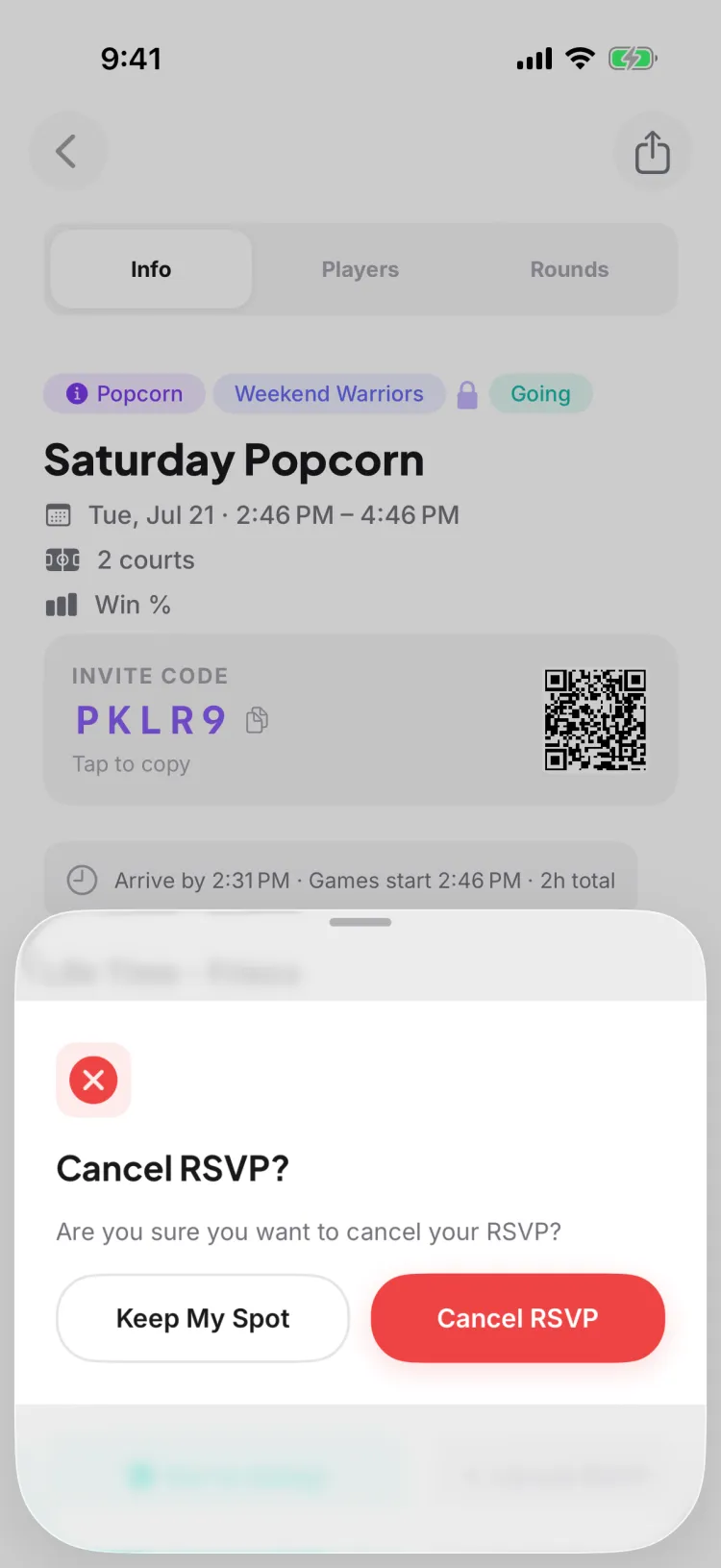
Pikel asks you to confirm with a "Cancel RSVP?" prompt so you don't drop out by accident. If the game has a waitlist, the prompt spells out what's about to happen: "Your spot will be given to the next person on the waitlist." Tap Keep My Spot to back out, or confirm to cancel.
The moment you confirm, Pikel does the fair thing automatically:
- If someone was waitlisted, the next person in line (the one who's been waiting longest) is promoted into your open seat, gets a notification that they're in, and everyone behind them shifts up a place. You don't have to tell anyone or hand off the spot yourself — it just happens.
- If nobody was waiting, the seat simply opens back up for someone new to accept.
Because the promotion is automatic, a spot you free up never sits empty while a game is full — which is exactly why cancelling early is the courteous move.
Step 4 — On the waitlist instead? Tap Leave Waitlist
If you were queued rather than confirmed, the button reads Leave Waitlist instead. Tap it and you drop off the list, and everyone behind you moves up a position. It's the same cancel action under the hood — Pikel just labels it for where you stand.
Pro tip
Cancel as soon as you know you can't make it. The instant you confirm, your seat is handed to the next waitlisted player — so an early cancel gives a teammate a real shot at playing. Wait too long and two things work against you: fewer people are still checking, and if you change your mind after the game has refilled, tapping Accept again lands you on the waitlist, not back in your old spot. Free it early, and you can always grab a later game with a clear conscience.
Get started
Pikel is free on iOS and Android — RSVP, change your mind, and let the waitlist sort itself out.
Frequently asked questions
How do I cancel my RSVP if I can't make it?
Open the game and tap Cancel RSVP to give up your spot — you can RSVP again later if your plans change. If the game had a waitlist, cancelling automatically promotes the next person in line and sends them a notification, so a full game still opens up for someone else.
What happens to my spot when I cancel?
If the game had a waitlist, your spot goes straight to the next person in line — Pikel promotes them the moment you cancel and sends them a notification, then renumbers everyone else up a place. If there's no waitlist, the seat simply frees up for someone new to grab.
Can I RSVP again after I cancel?
Yes. Cancelling just releases your spot — the game flips back to Accept and Decline, so you can accept again if your plans change. One caveat: if the game filled up while you were out, accepting again puts you on the waitlist instead of straight back in, so you may not get that exact seat back.
How do I get off a game's waitlist?
Open the game and tap Leave Waitlist. You drop off the list and everyone behind you moves up a spot. It's the same cancel action — Pikel just labels it Leave Waitlist while you're waitlisted rather than confirmed.
Does Pikel ask me to confirm before cancelling?
Yes. Tapping Cancel RSVP pops a "Cancel RSVP?" confirmation. If the game has a waitlist, it reminds you the spot goes to the next person in line. Tap Keep My Spot to back out, or confirm to cancel — same on iOS and Android.