How to Link Your DUPR Account in Pikel


Linking DUPR is what turns the games you already play in Pikel into games that count. Your Dynamic Universal Pickleball Rating is earned from real match results — and once your account is connected, a rated Pikel match can feed straight into it instead of disappearing into a group chat. It's a two-minute, one-time step. Here's exactly how to do it and what changes once you're linked.
Before you start
You need a DUPR account — it's free. If you've played in a sanctioned tournament or at a club that reports scores, there's a good chance one already exists under your name. If not, creating one takes a minute. When you link inside Pikel, you'll sign in to that DUPR account on DUPR's own screen, so have your DUPR login handy.
One thing to know up front: linking connects your account, it doesn't upload anything by itself. Your scores reach DUPR only when they're submitted from a rated game — so nothing moves until you actually play and results are confirmed.
Step 1 — Open your Profile and find "Connect DUPR"
Head to your Profile. Near the top, under your avatar, you'll see a Connect DUPR banner — a purple-to-teal card that reads "Your Pikel games can count toward your official rating." Tap it.
(Linking is also offered during onboarding when you first set up Pikel — if you connected then, you're already done and your rating shows here instead of the banner.)
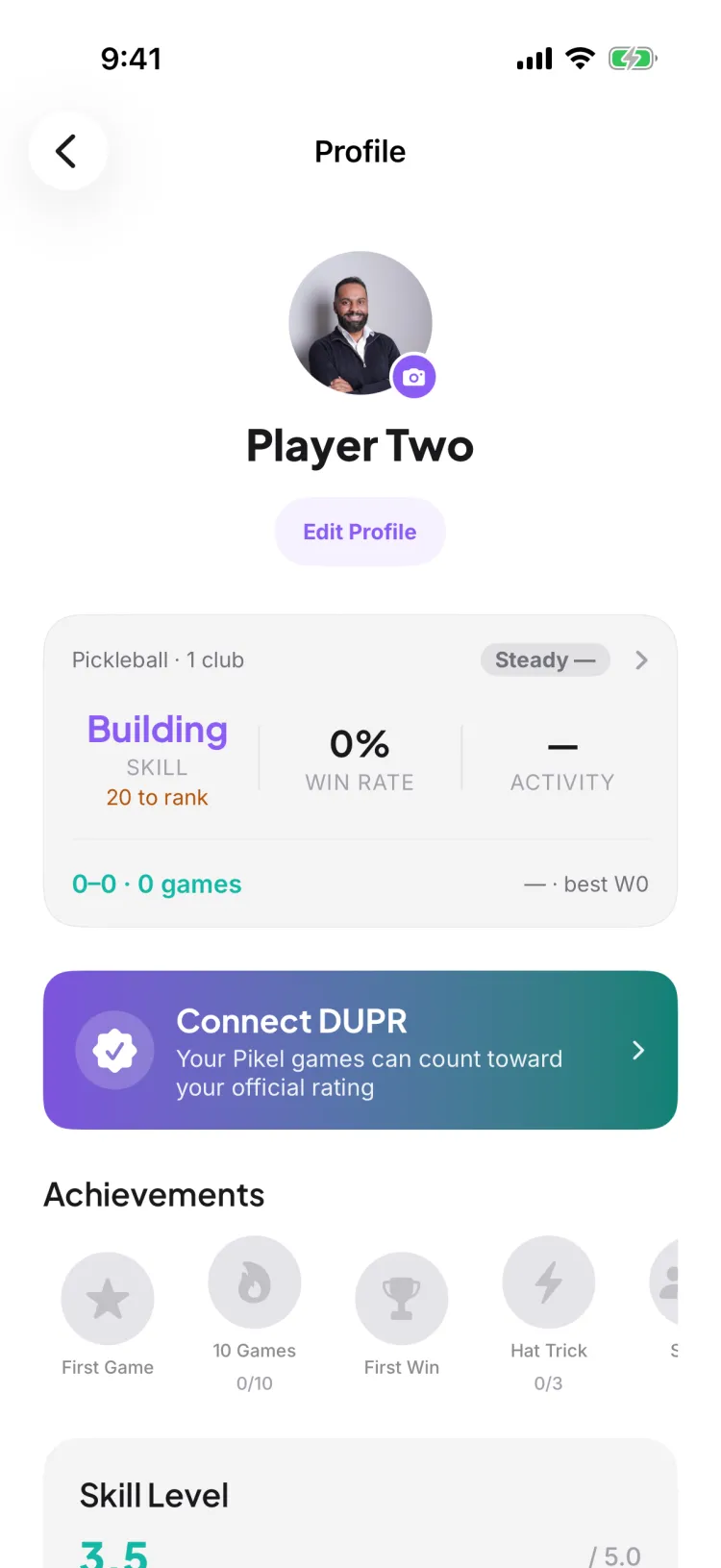
Step 2 — Review what linking does, then tap Connect DUPR
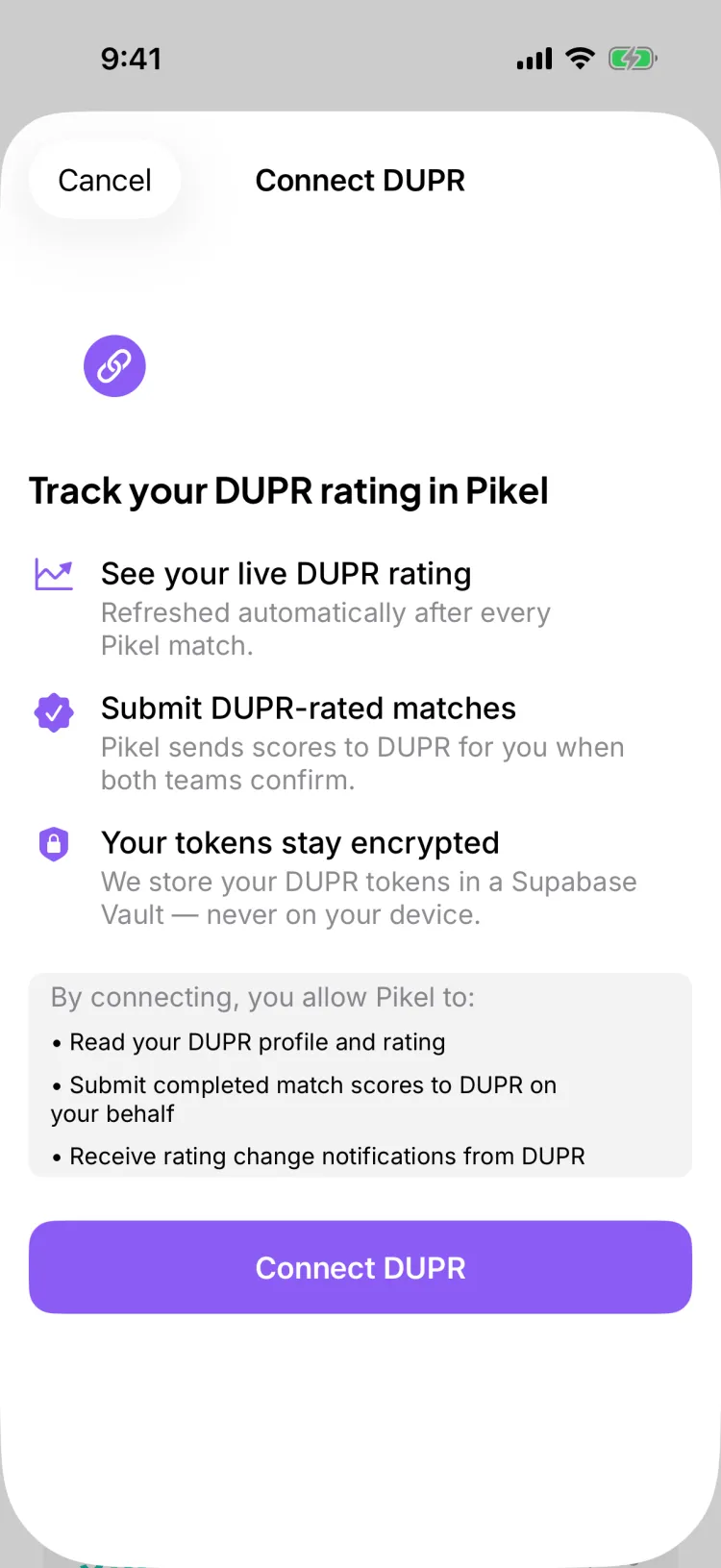
Tapping the banner opens a short explainer titled Connect DUPR. It lays out what you get — your live rating refreshed after every match, automatic score submission, and encrypted tokens — and, right below, exactly what you're consenting to. By connecting, you allow Pikel to:
- Read your DUPR profile and rating
- Submit completed match scores to DUPR on your behalf
- Receive rating change notifications from DUPR
That's the whole deal — no surprises. Read it over, then tap the Connect DUPR button at the bottom.
Step 3 — Sign in to your DUPR account
DUPR's own login screen opens inside Pikel. Sign in with your DUPR account and approve the connection. This part is handled entirely by DUPR — Pikel never sees or stores your DUPR password. Only an encrypted connection token comes back, and it's kept in a secure vault, never on your device.
If you don't have a DUPR account yet, create one first on DUPR, then come back and link — the sign-in screen is where the two apps shake hands.
Step 4 — See your rating on your Profile
Once the connection completes, the banner collapses into a slim line on your Profile showing your DUPR rating and when it last synced, with a Manage link. That's your confirmation it worked.
Tap Manage anytime to see your rating trend, refresh it, open your profile in DUPR, hide your rating from other Pikel players, or disconnect. You're always in control — disconnecting stops submissions, and you can reconnect whenever you like.
From here on, when you play a rated game in Pikel, the scores submit to DUPR with one tap after both teams confirm, and your rating updates. No spreadsheets, no double entry — your record builds from the games you already show up for.
Pro tip
Link before your next session, not after. DUPR games in Pikel are doubles, and a match only reports once all four players have linked their own DUPR account — so a game you play today while anyone's unlinked won't count. Two minutes now means every rated game from here forward can land on your record — and nudge your regulars to link too, since a single unlinked player blocks the whole match from reporting.
Get started
Pikel is live on iOS and Android with built-in DUPR linking and one-tap sync. Link your account and start turning weekly play into a real rating.
Frequently asked questions
Do I need a DUPR account before I link?
Yes, but it's free and quick. Creating a DUPR account costs nothing, and if you've ever played a sanctioned tournament or a club that reports scores, you may already have one. When you link in Pikel, you sign in to that DUPR account on DUPR's own screen — Pikel never sees your password.
Does linking upload my old games or change my rating?
No. Linking just connects your account. It doesn't push anything on its own — scores reach DUPR only when they're submitted from a rated game, after both teams confirm. Your rating still comes from your own match history; linking makes sure your Pikel games can count toward it going forward.
Where does my rating show up after I link?
On your Profile. Once you're connected, the Connect DUPR banner flips to show your DUPR rating and when it last synced, with a Manage option. Tap Manage to refresh your rating, open your profile in DUPR, hide your rating from other players, or disconnect.
Can I hide my rating or disconnect later?
Yes. From the Manage screen you can hide your DUPR rating so other Pikel players see no number on your profile, or disconnect entirely. Disconnecting stops Pikel from submitting your matches, and you can reconnect anytime.
Is this the same as linking my club to DUPR?
No — they're two different things. This links your personal DUPR account from your Profile. Linking a club is a separate admin action in club settings. For a club's weekly games to count, the club needs to be linked and each player needs their own account linked.