How to Leave a Pickleball Club


Sometimes a club runs its course — you moved, the crew changed, or you just joined the wrong one by mistake. Leaving is quick and it's cleanly scoped: it drops you from that single club without touching your account or any other club you're in. Here's exactly where the button lives and what happens when you tap it.
Step 1 — Open the club's settings
From the club you want to leave, tap the gear icon in the top corner to open Club Settings. Every member can reach this screen — you don't need to be an admin to leave. On iOS the gear sits in the top-right of the club; on Android it's the settings icon on the club's detail screen.
Step 2 — Find Leave Club at the bottom
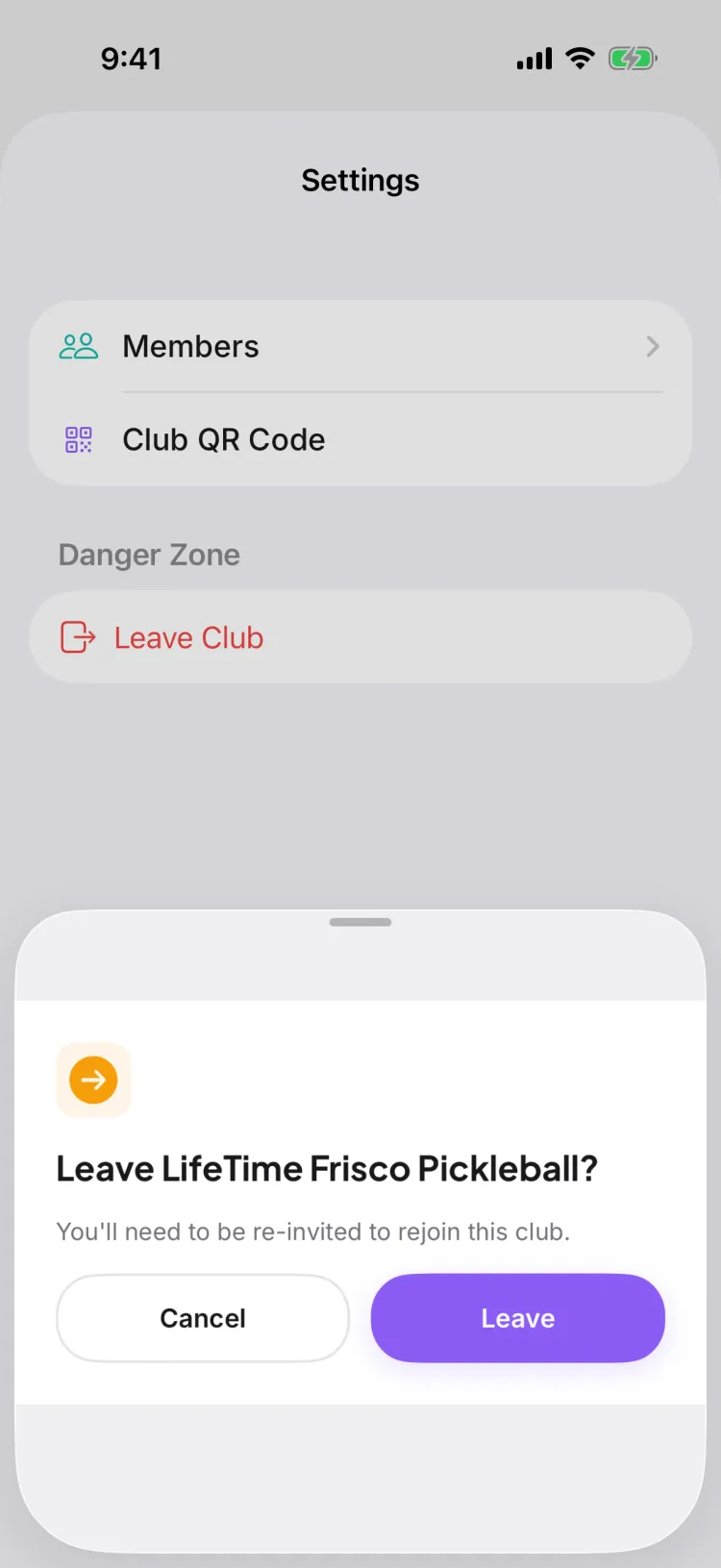
Scroll to the bottom of Club Settings. On iOS it sits under a section labeled Danger Zone; on Android it's just the red Leave Club row at the very bottom, with no section header. Either way it's a red row with a door icon — the only control you need. Leaving is a one-tap action, not a settings toggle.
If you don't see Leave Club, it's because you own the club — jump to Step 4.
Step 3 — Confirm you're leaving
Tapping Leave Club brings up a confirmation so you never leave by accident:
- On iOS, a sheet asks "Leave [club name]?" — tap Leave to go through, or Cancel to stay.
- On Android, a dialog reads "Leave Club?" with the note "You'll need to be re-invited to rejoin this club." — tap Leave or Cancel.
Confirm, and you're out. Pikel removes you from the club and from any groups inside it in the same step — you don't have to leave each group one by one. Your account and every other club stay put; the one you left simply drops off your Clubs tab.
Step 4 — If you're the club's owner
Owners get a different bottom row. Instead of Leave Club you'll see Delete Club — an owner never gets a plain "leave" button at all, so a club is never left with nobody in charge.
So as an owner you have two honest paths:
- Keep the club running and simply step back from day-to-day — lean on your admins and co-hosts to carry game day.
- Delete the club if it's truly done. Delete Club schedules the club for removal in 7 days, and you can cancel anytime before then from the same screen if you change your mind.
Pro tip
Leaving is per-club, not per-account — a useful thing to remember if you belong to several. If you only meant to quiet one noisy club, you don't have to leave to get peace: you can stay a member and just Mute Notifications on its chat instead. And if you do leave a private club and later want back in, there's no standing invite waiting — grab a fresh link or five-character code from an admin. (A public club you can simply find in Explore and rejoin on your own.)
Get started
Pikel is free on iOS and Android — join the clubs that fit, leave the ones that don't, all from your Clubs tab.
Frequently asked questions
How do I leave a club?
Open the club, tap the gear to open its settings, scroll to the Danger Zone, and tap Leave Club — then confirm. It removes you from that one club (and any groups inside it) while your account and every other club you belong to stay exactly as they are.
I'm the club owner — why can't I see Leave Club?
Owners don't get a Leave Club button; you see Delete Club instead. Pikel won't let the last owner walk away and leave a club with nobody in charge — so if you're the sole owner you either keep the club or delete it, rather than orphaning it.
Does leaving a club delete my account or my other clubs?
No. Leaving only removes your membership in that one club, plus any groups inside it. Your Pikel account, your games in other clubs, and every other membership are untouched — they all still show up in your Clubs tab.
Can I rejoin a club after I leave?
Yes. If the club is public, you can find it again in Explore and rejoin with one tap. If it's private or invite-only, leaving doesn't hold your spot — you'll need a fresh link, QR code, or five-character join code from an admin to come back.
What happens to the club's groups when I leave?
Leaving the club also removes you from any groups that live inside it, in one step. You don't have to leave each group separately first — the club and its groups let go of you together.