How to Claim Your Spot in a Pickleball Game


Ever get added to a game before you'd even downloaded the app? That's a guest spot — the organizer typed your name onto the roster so you'd count as a player. Claiming it turns that placeholder into your account: the games, matches, and stats attached to it move onto your profile, and your real name replaces the placeholder on the list. Here's how to claim your spot when Pikel asks "Is this you?"
Step 1 — Get added as a guest
There's nothing to do for this step — it happens on the organizer's side. When they set up the game, they can add players who aren't in Pikel yet as guests: they just type your name. You'll appear on the player list with your name and an amber Guest badge. That badge is the signal that the spot is a placeholder waiting for the real you.
Step 2 — Open the game and find your name
There are two ways to reach the game:
- Tap the invite link or code the organizer shares. That opens Pikel's join screen, where a "Were you added as a guest?" card lists the names you can claim.
- Open the game inside Pikel if you're already in the organizer's club — head to the game and its player list.
Either way, sign in or create your account first. Claiming links the spot to a real account, so the "Is this you?" prompt only shows once you're signed in. On the roster, look for your name with the Guest badge — right next to it, Pikel shows an "Is this you?" chip.
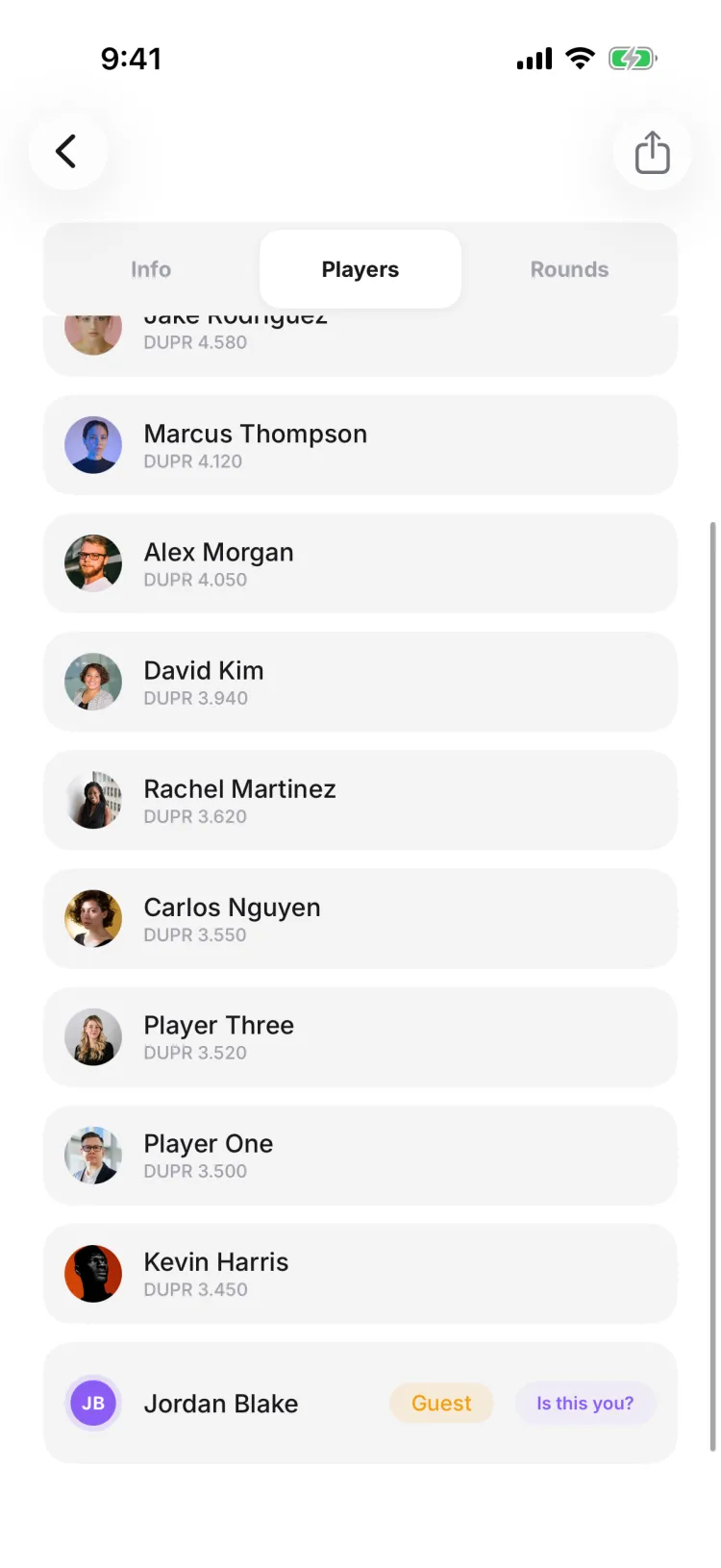
Step 3 — Tap "This is me"
Tap the "Is this you?" chip (or your name in the card) and confirm. If the game claims instantly — the default — Pikel merges the guest spot into your account right away and celebrates with "You're in!" Your games and stats are now on your profile, and your real name takes the placeholder's place on the roster. That's the whole thing: one tap and the spot is yours.
Step 4 — If the game needs approval
Some organizers turn on approval for guest claims. On those games the button asks you to request the claim instead of confirming it — it reads "Request to claim" on iOS and "Request" on Android. Tap it and Pikel files a request with the organizer — you'll see a calm "Request sent" confirmation. Once they confirm you, the spot merges into your account and you become a full participant. Nothing else to do; just wait for the nod.
Pro tip
Claiming isn't time-limited — you can claim your spot at any stage, even after the games have finished, and your history still merges in. And if it's a big event with a long guest list, the card grows a "Find your name" search box once there are more than eight names, so you can type the first few letters and jump straight to yourself instead of scrolling.
Get started
Pikel is live on iOS and Android — claim your spot, keep your games, and play as yourself.
Frequently asked questions
What does "Is this you?" mean in Pikel?
When an organizer adds you to a game before you're in the app, they add you as a guest — a placeholder with your name on the roster and an amber "Guest" badge. Once you open that game signed in, Pikel shows an "Is this you?" chip next to that name so you can claim the spot and make it really yours.
Do I need an account to claim my spot?
Yes. Claiming merges the guest placeholder into a real account, so sign in or create one first — it's free and takes a moment. Then open the game and tap your name; the "Is this you?" prompt only appears once you're signed in.
What happens to my games when I claim a spot?
They follow you. Claiming re-points every game, match, and standing from the guest placeholder onto your account, and your real name replaces the placeholder on the roster. Your match history and stats move with you, so you're a full participant, not just a name on the list.
The claim button asks me to request it instead of saying "This is me" — why?
The organizer set that game to approve claims. Tap it — it's labelled "Request to claim" on iOS and "Request" on Android — and Pikel sends the organizer a request ("Request sent"); once they confirm you, the spot is yours. Games left on the instant default just say "This is me" and claim on the spot.
Can I claim a guest spot I created for someone else?
No. Pikel only offers the "Is this you?" chip for guest spots you didn't create, and it won't show if you're already in that game under your own account — so you can't accidentally claim someone else's placeholder.